<?xml version="1.0" encoding="utf-8"?><feed xmlns="http://www.w3.org/2005/Atom" ><generator uri="https://jekyllrb.com/" version="3.9.5">Jekyll</generator><link href="https://www.merwin.ca/feed.xml" rel="self" type="application/atom+xml" /><link href="https://www.merwin.ca/" rel="alternate" type="text/html" /><updated>2024-07-04T19:41:10+00:00</updated><id>https://www.merwin.ca/feed.xml</id><title type="html">Nishanth Merwin</title><subtitle>A blog about technology and stuff related</subtitle><entry><title type="html">Connecting LLMs to chemoinformatics</title><link href="https://www.merwin.ca/rag-chemoinformatics/" rel="alternate" type="text/html" title="Connecting LLMs to chemoinformatics" /><published>2024-07-02T11:42:00+00:00</published><updated>2024-07-02T11:42:00+00:00</updated><id>https://www.merwin.ca/rag-chemoinformatics</id><content type="html" xml:base="https://www.merwin.ca/rag-chemoinformatics/"><![CDATA[<p>In this article, expect to see a mix of my personal insights, high level overviews and a few technical deep-dives into
LLMs and chemoinformatics.</p>

<h1 id="background">Background</h1>

<p>Over the past 8ish years, I’ve been working professionally across various aspects of drug discovery. Early on in my career, I focussed a lot on applying chemoinformatics techniques to make natural product discovery more effective. In my current role, we’re developing strategies to make data more discoverable and accessible using LLMs within clinical trial operations. As I started to dig into one of the more common techniques for this, retrieval augmented generation (RAG), I began to see a ton of similarities to how we used to search for chemical structures.</p>

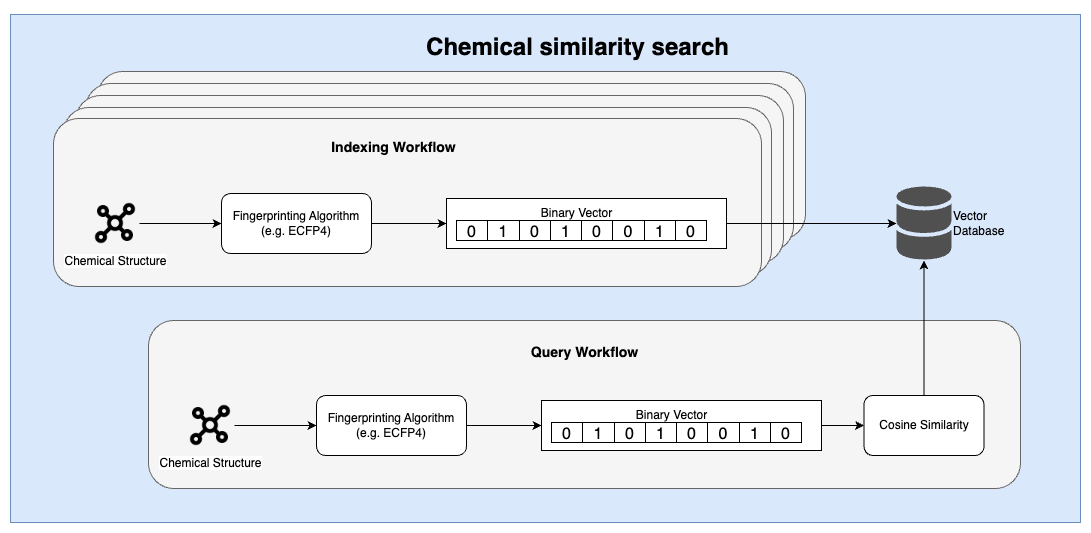
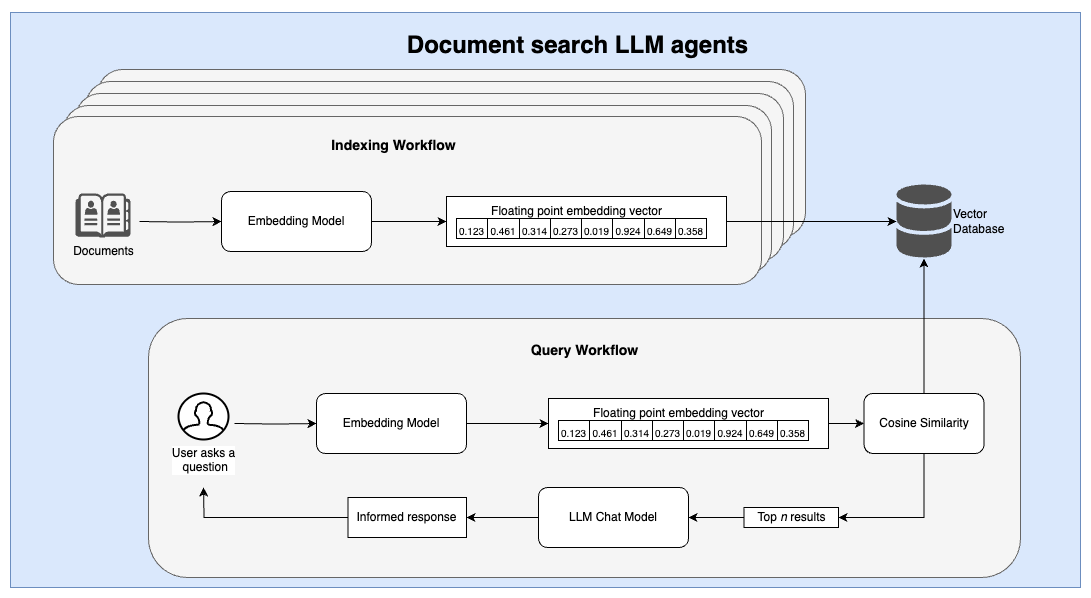
<p>Both of these techniques rely on the core concept of vectorizing a complex input, storing this information in a specialized database and then doing simple distance measurements. These are demonstrated in the workflow images depicted below.</p>

<p align="center">
  <img src="/assets/images/tanimoto_rag-tanimoto.drawio.png" title="RAG Charts" />
  <figcaption>A high level overview of Tanimoto based chemical similarity searches.</figcaption>
</p>

<p align="center">
  <img src="/assets/images/tanimoto_rag-llms.drawio.png" title="RAG Charts" />
  <figcaption>A typical RAG based workflow for document retrieval and question-answering agents.</figcaption>
</p>

<h2 id="similarities-between-the-two-workflows">Similarities between the two workflows</h2>

<p>At a high level, there are several thematic similarities between the two workflows. First, an embedding model (or algorithm) is used
to ingest a complex input and translate it into a simplified representation that can then be indexed. Second, a similarity search
is conducted using a relatively simple distance measure. These distance measures can be performed using highly optimized vector databases.</p>

<p>In both workflows, an indexing and querying pipeline is required to ingest and index data into a database prior to individual user
queries.</p>

<h2 id="differences">Differences</h2>

<h3 id="chemicals-vs-unstructured-text">Chemicals vs unstructured text</h3>

<p>Abstract unstructured text is far more complex and unpredictable
than the typical kinds of organic chemical structures that are usually queried in drug discovery.</p>

<p>Chemical structures are often stored in a text-based format called SMILES. Over the past decade, there has been significant
research on leveraging advances in language models to ingest and generate novel
chemical entities, known as generative chemistry. Unlike unstructured text that may provide narrative stories over long
context windows, chemical structures have a fixed length with the majority of drug-like molecules containing fewer than 1,000 tokens.
Drug like molecules also only have a small number of letters (atoms) have to follow a set of chemical rules
 (e.g. max number of bonds per atom) that limit the overall complexity of the data structure.</p>

<p>Working with simpler data structures meant that we were able to use simpler encoding methods (see more below).</p>

<h3 id="embedding-models-vs-hashing-algorithms">Embedding models vs hashing algorithms</h3>

<p>Embedding models for text are trained on large amounts of text data to better group text-based concepts. In the past, strategies
like word2vec were used to convert words into vectors that retained some degree of sematic understanding. 
Today, embedding models are much more sophisticated than this and can relate abstract concepts not only across words but across varying lengths
of multi-lingual text.</p>

<p align="center">
  <img src="https://upload.wikimedia.org/wikipedia/commons/3/3f/Word_vector_illustration.jpg" title="word2vec semantic relationships" />
  <figcaption>Word2Vec blew my mind when I saw this in the mid-2010s.</figcaption>
</p>

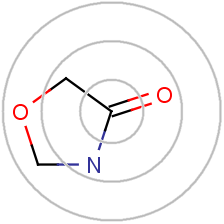
<p>In the chemistry side, the most popular embedding strategy was something called the circular fingerprint. Here, individual atoms were
profiled according to their surrounding environment to generate a unique hash. This hash was then converted to a number between 0-1023 using a bloom
filter to generate a fixed-length binary vector.</p>

<p align="center">
  <img src="https://docs.chemaxon.com/display/docs/images/download/attachments/1806333/ecfp_iterations.png" title="word2vec semantic relationships" />
  <figcaption>Word2Vec blew my mind when I saw this in mid-2010s.</figcaption>
</p>

<p>This is not a perfect difference, simpler strategies (like word2vec) were used in NLP while more 
<a href="https://pubs.acs.org/doi/10.1021/acs.jcim.7b00616">complex ML based systems</a> have been 
employed and are continuously being iterated upon in the chemoinformatics domain.</p>

<h3 id="vector-databases">Vector databases</h3>

<p>At the time, for most of my research career, chemical similarity searches were done in a Python script where
I performed a nested for-loop to compare my set of query molecules to everything in our database. However, when
building more end-user focussed systems, I have used the 
<a href="https://www.rdkit.org/docs/Cartridge.html">RDKit Postgres cartridge</a>
to simplify molecule indexing and
similarity searches.</p>

<p>Today however, there are so many vector databases to choose from that support vector indexing and distance based queries out of the box.
Tools like ChromaDB as well as extensions for common databases like Elasticsearch and Postgres allow for RAG-based
agents to be built very easily as extensions on top of existing databases. The open-source community and
tools for LLMs are much more developed (not surprising given the recent LLM hype), but this could definitely help
if I try my hand out at some chemoinformatics again soon!</p>

<p>One of the biggest challenges for building chemical databases wasn’t necessarily the chemical structures themselves but
handling all of the unstructured metadata that accompanied each entity. It almost makes me wonder if we could build a better
chemical database using LLMs to embed and contextualize molecular properties currently stored in text form.</p>

<p>If you like more content like this, let me know! Reach out on <a href="https://www.linkedin.com/in/nmerwin/">LinkedIn</a> or leave a comment below.</p>]]></content><author><name>nishanth</name></author><category term="blog" /><category term="chemooinformatics" /><category term="LLMs" /><category term="data science" /><summary type="html"><![CDATA[Comparing some of the techniques used in chemoinformatics research in the past to modern day LLM powered workflows.]]></summary><media:thumbnail xmlns:media="http://search.yahoo.com/mrss/" url="https://www.merwin.ca/assets/images/markdown.jpg" /><media:content medium="image" url="https://www.merwin.ca/assets/images/markdown.jpg" xmlns:media="http://search.yahoo.com/mrss/" /></entry><entry><title type="html">Swinging with trigonometry</title><link href="https://www.merwin.ca/pendulum_game/" rel="alternate" type="text/html" title="Swinging with trigonometry" /><published>2020-01-18T11:42:00+00:00</published><updated>2020-01-18T11:42:00+00:00</updated><id>https://www.merwin.ca/pendulum_game</id><content type="html" xml:base="https://www.merwin.ca/pendulum_game/"><![CDATA[<h2 id="introduction">Introduction</h2>

<p>As a result of commuting, I’ve found myself back playing mobile phone and web games on the train.
It’s a nice pass time, but I recently came around a game that although seems remarkably simple, it’s actually
a ton of fun to play (plus it gets really challenging).
<a href="https://www.newgrounds.com/portal/view/724232">Handulum +</a> is a physics based game where you can
“catch” a falling ball and swing it along a pendulum. I got decently far, but wanted to see what it 
would take to actually recreate this sort of physics engine. I’m not really a game developer, but
I’ve been really interested in developing more low level graphics for creative side projects and
though this would be a good place to start. Check out Handulum + below though, its miles beyond
anything I could create!</p>

<figure align="center">
    <video height="300" width="500" autoplay="" loop="">
        <source src="https://video.twimg.com/tweet_video/EOkWxJhWoAYWYPH.mp4" type="video/mp4" />
        &lt;/source&gt;
    </video>
</figure>

<p>The first thing I did was choose my ecosystem. Since my day job mostly revolves around Python,
I quickly found myself reading into <a href="https://www.pygame.org/wiki/GettingStarted"> PyGame</a>.
The syntax was brief enough and it could draw circles and lines, which was more than enough on the graphics
side for me. My main goal here was to recreate the physics involved, not spend too much time
trying to make it pretty (although that might be a fun extension to this project). A few 
<a href="http://www.petercollingridge.co.uk/tutorials/pygame-physics-simulation/">tutorials</a>
later, I now had a bouncing ball that somewhat emulated gravity.</p>

<p>But this game obviously required a bit more than bouncing. I needed to figure out how to
get the ball to move in circle, and even more, observe some conservation of momentum
as it attached and released from the pendulum. This was certainly more challenging
than I had initially thought, and quickly found myself lost in Google searches and
<a href="https://en.wikipedia.org/wiki/Pendulum_(mathematics)#Simple_gravity_pendulum">endless equations</a>
describing motion in “simple” pendulums (not so simple for me!).</p>

<p>When I first started, I simply tried to do everything via code, but I quickly found the ball
moving in all sorts of crazy ways, and not getting and progress.
In the end, I found it best to just draw it out, and pull out some handy-dandy trigonometry.
What’s not shown below are the 10+ other pages of scribbles that I threw away along the process.</p>

<p align="center">
  <img src="/assets/images/pendulum/trig.jpg" title="Does this resemble trigonomotry?" />
</p>

<p>I realized  were two key aspects that I had to consider:</p>
<ul>
  <li>Converting forces in x and y directions to an angular direction via trigonometry (thanks
  to SOH-CAH-TOA).</li>
  <li>Understanding that angular velocity can be represented as linear velocity (in x and y
  direction) via the angle of the tangent, which luckily enough is also calculable
  via trigonometric equations.</li>
</ul>

<p>Overall, this took me quite a bit longer than I expected, but I did end up learning a lot
and brushing up on some mathematics that I had long forgotten. Doing this in Python made
this project a lot easier as I was very comfortable code organization and structuring
everything in an object oriented manner. Take a look at the prototype below:</p>

<div style="position:relative; padding-bottom:calc(78.50% + 44px)"><iframe src="https://gfycat.com/ifr/FlamboyantColossalIndianglassfish" frameborder="0" scrolling="no" width="100%" height="100%" style="position:absolute;top:0;left:0;" allowfullscreen=""></iframe></div>

<p>If you’re even more curious, feel free to fork the repo and try running it yourself.
Let me know what you think.</p>

<p>Repo: <a href="https://github.com/nishanthmerwin/handball">HandBall</a></p>]]></content><author><name>nishanth</name></author><category term="blog" /><category term="game development" /><category term="math" /><category term="pygame" /><summary type="html"><![CDATA[Building a simply physics based game using pygame.]]></summary><media:thumbnail xmlns:media="http://search.yahoo.com/mrss/" url="https://www.merwin.ca/assets/images/markdown.jpg" /><media:content medium="image" url="https://www.merwin.ca/assets/images/markdown.jpg" xmlns:media="http://search.yahoo.com/mrss/" /></entry><entry><title type="html">Making sense of XKCD</title><link href="https://www.merwin.ca/xkcd_writeup/" rel="alternate" type="text/html" title="Making sense of XKCD" /><published>2019-01-28T11:42:00+00:00</published><updated>2019-01-28T11:42:00+00:00</updated><id>https://www.merwin.ca/xkcd_writeup</id><content type="html" xml:base="https://www.merwin.ca/xkcd_writeup/"><![CDATA[<h2 id="introduction">Introduction</h2>

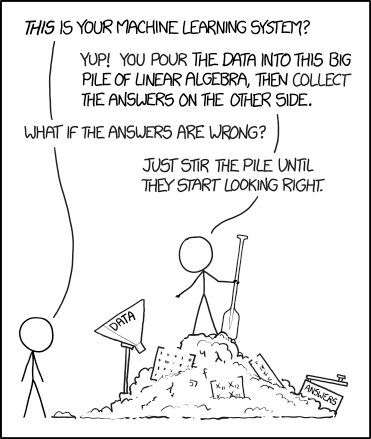
<p>Who doesn’t love <a href="https://xkcd.com/">XKCD</a>? A while back, around the start of my grad school, I came across a relevant machine learning comic from Randall (see below). Today, we’re going to throw some NLP and topic modeling into a pile and hope something fun comes out the other end.</p>

<figure align="center">
  <img src="https://imgs.xkcd.com/comics/machine_learning.png" title="The pile gets soaked with data and starts to get mushy over time, so it's technically recurrent." />
  <figcaption>Test caption.</figcaption>
</figure>

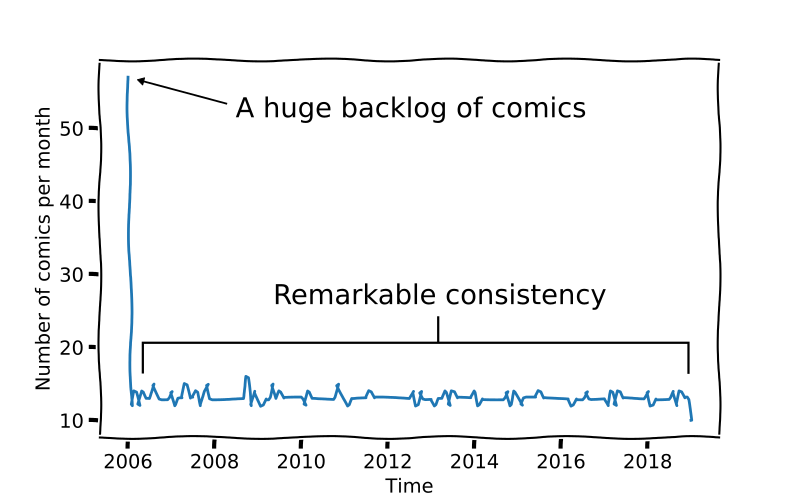
<p>First things first, lets download some of these comics. Altogether, Randall Munroe (author of XKCD) has been extremely productive and has created over 2100 comics since the inception of XKCD on January 1st 2006! Looking at this, he is scarily consistent, averaging about 13 comics a month. The first month is an outlier, I imagine he had a butt load of comics he had drawn and released them all onto the internet at once. But I truly admire his consistency!</p>

<p align="center">
  <img src="/assets/images/xkcd/productivity.png" title="My attempt at recreating some XKCD-esque charts" />
</p>

<p>Next, lets gather some more data. Thankfully, the folks at <a href="https://www.explainxkcd.com/wiki/index.php/Main_Page">Explained XKCD</a> have annotated each of these comics with a transcript as well as their own explanations for each. This, along with the actual images, meant I had a rich dataset to work with of roughly unstructured text and their corresponding comics.</p>

<h3 id="we-have-data-now-what">We have data, now what?</h3>

<p>The title of this section accurately describes how I felt at this stage in the project. With work, I usually have a goal or end project, but I wanted to use this dataset to learn some new skills. So, I thought to try a bit of topic modelling. I really like this technique because it essentially allows the data to “self-organize”! Basically, based on the co-occurance of specific words, we can identify several topics that are commonly used in XKCD comics. After surprisingly little actual coding, I was able to build a Latent Ditrecht Allocation (LDA) model that identified 10 topics of interest.</p>

<p>Creating the model itself was pretty simple:</p>

<ol>
  <li>Lemmatizing all words identified in both transcript and explanations of the comic. Gensim / NLTK libraries helped out a lot here!</li>
  <li>Create a dictionary, and remove all words that appear relatively infrequently.</li>
  <li>Use gensim to build an LDA model across 10 topics, passing over the data 20 times.</li>
</ol>

<p>And with that, we get the following topics revealed.</p>

<table class="mbtablestyle">
  <thead>
    <tr>
      <th style="text-align: center">Topic Number</th>
      <th style="text-align: center">Words</th>
      <th style="text-align: center">What I think it means?</th>
    </tr>
  </thead>
  <tbody>
    <tr>
      <td style="text-align: center">0</td>
      <td style="text-align: center">megan, black, ponytail, friend, game, panel, year, beret, number, phone</td>
      <td style="text-align: center">People and timelines</td>
    </tr>
    <tr>
      <td style="text-align: center">1</td>
      <td style="text-align: center">stapl, momentum, len, megan, cat, repair, beret, ponytail, pointer, black</td>
      <td style="text-align: center">??</td>
    </tr>
    <tr>
      <td style="text-align: center">2</td>
      <td style="text-align: center">cabl, jack, geek, ingredi, pump, verb, guest, sister, factori, weekend</td>
      <td style="text-align: center">Cables?</td>
    </tr>
    <tr>
      <td style="text-align: center">3</td>
      <td style="text-align: center">barrel, bowl, polar, weekend, screenshot,   float, dozen, flowchart, flash, sleep</td>
      <td style="text-align: center">Barrels</td>
    </tr>
    <tr>
      <td style="text-align: center">4</td>
      <td style="text-align: center">gold, megan, michael, pool, sheet, love, backpack, feynman, peni, bird</td>
      <td style="text-align: center">Gold?</td>
    </tr>
    <tr>
      <td style="text-align: center">5</td>
      <td style="text-align: center">band, fluid, song, wikipedia, megan, bush, word, game, monster, music</td>
      <td style="text-align: center">??</td>
    </tr>
    <tr>
      <td style="text-align: center">6</td>
      <td style="text-align: center">elev, twitter, megan, reddit, cabl, friend, kernel, river, user, lake</td>
      <td style="text-align: center">??</td>
    </tr>
    <tr>
      <td style="text-align: center">7</td>
      <td style="text-align: center">skateboard, senat, steve, firefli, escal, summer, paul, democrat, republican, adam</td>
      <td style="text-align: center">Politics</td>
    </tr>
    <tr>
      <td style="text-align: center">8</td>
      <td style="text-align: center">chess, pokemon, knight, hors, basketbal, sister, player, captur, piec, board</td>
      <td style="text-align: center">Chess and pokemon</td>
    </tr>
    <tr>
      <td style="text-align: center">9</td>
      <td style="text-align: center">virus, backup, keyboard, chip, belt, dougla, drone, black, beret, ghost</td>
      <td style="text-align: center">??</td>
    </tr>
  </tbody>
</table>

<p>Looking through some of these, there were some that were surprisingly accurate. For example, barrels is a recurring theme in his works, and was deserving of a whole topic on its own. Other topics such as 2, 5, 6 and 9 were very rarely observed.</p>

<h3 id="lets-search-by-topic">Lets search by topic!</h3>

<p>From here, I started playing around to see how we could sort and search for these topics among all of these comics. In particular, I wanted to share this with all of you.
So, using the LDA model for each of these topics, I wanted to create a web app with SLIDERS! Realistically, you can use the sliders to identify
the mix of these topics you want, and with my website, I’ll identify the top five comics that match your search. Kinda like the DJ booth of XKCD comics!</p>

<p>I built this pretty rapidly using Flask to act as the backend + server side rendering engine. Heroku allows you to deploy flask applications with ease, and for free so you can find it all on there.</p>

<ul>
  <li><a href="https://protected-mesa-78784.herokuapp.com/">WebApp</a></li>
  <li><a href="https://github.com/nishanthmerwin/xkcd_lda_flaskapp">WebApp Source code</a></li>
  <li><a href="https://github.com/nishanthmerwin/xkcd_lda">GitHub code for this analysis</a></li>
</ul>

<p>Overall, I was pretty impressed with this dataset. In the end, I wanted to put something out before diving too much into the data science-y aspects of it, as I could have diven much deeper! For anyone curious, here are a few more ideas I had / might pursure with this dataset:</p>

<ul>
  <li>Sentiment analysis (How positive / negative / angry do each of the comics read?)</li>
  <li>Image analysis using deep learning
    <ul>
      <li>Can we cluster according to these topics that we identified?</li>
    </ul>
  </li>
  <li>How many topics is ideal? What words are most common?</li>
  <li>With StyleGAN out there now, can we generate some of these drawings of Megan / beret man?</li>
</ul>]]></content><author><name>nishanth</name></author><category term="blog" /><category term="visualization" /><category term="data science" /><summary type="html"><![CDATA[Using NLP and computer vision techniques to sort XKCD comics]]></summary><media:thumbnail xmlns:media="http://search.yahoo.com/mrss/" url="https://www.merwin.ca/assets/images/markdown.jpg" /><media:content medium="image" url="https://www.merwin.ca/assets/images/markdown.jpg" xmlns:media="http://search.yahoo.com/mrss/" /></entry><entry><title type="html">#SWDChallenge Makeover</title><link href="https://www.merwin.ca/swd/" rel="alternate" type="text/html" title="#SWDChallenge Makeover" /><published>2018-09-05T11:42:00+00:00</published><updated>2018-09-05T11:42:00+00:00</updated><id>https://www.merwin.ca/swd</id><content type="html" xml:base="https://www.merwin.ca/swd/"><![CDATA[<h2 id="introduction">Introduction</h2>

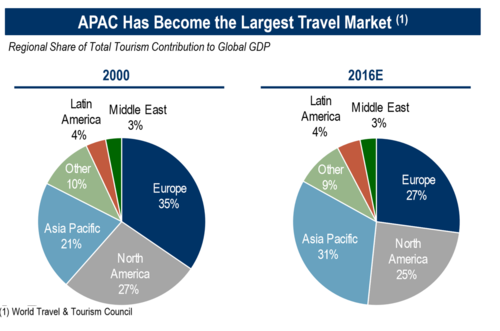
<p>I recently came across <a href="http://www.storytellingwithdata.com/">Storytelling With Data</a>, and their #SWDChallenge. Sad that I missed their last round, I was quick to jump on this month’s <a href="http://www.storytellingwithdata.com/blog/2018/8/24/swdchallenge-how-would-you-makeover-this-graph">challenge</a>. The challenge this month was to revamp this figure depicting the change in global travel markets from 2000 to 2016.</p>

<p><img src="/assets/images/makeover_challenge.png" /></p>

<p>The first thing I saw with this chart is the title, and I had absolutely no idea what APAC was. Only after playing with the data for a while, I realized that APAC=Asia Pacific, and that in 2016, this region has the largest share of the travel tourism market. While great to include a clear takeaway in a figure, it was lost in translation. Next, I realized that my eyes were constantly bouncing between the two pie charts, more so comparing the percentage values than the actual size of the pie (pie charts are <a href="https://blog.funnel.io/why-we-dont-use-pie-charts-and-some-tips-on-better-data-visualizations">notoriously</a> <a href="https://www.richardhollins.com/blog/why-pie-charts-suck/">difficult</a> to <a href="http://www.storytellingwithdata.com/blog/2011/07/death-to-pie-charts">interpret</a>) So, moving forward, I knew I had to fix a few things:</p>

<ol>
  <li>Use consistent acronyms across the chart.</li>
  <li>Provide a way for data to be directly compared, without the use of pie charts.</li>
</ol>

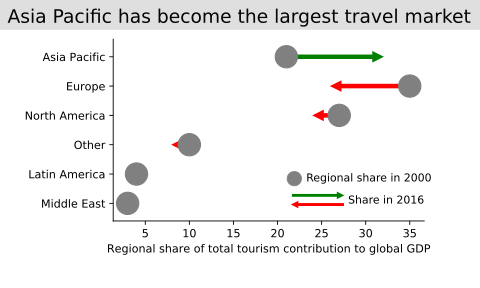
<p>With these two goals in mind, I created a new interpretation of this data set:</p>

<p><img src="/assets/images/makeover_challenge_revamped.png" /></p>

<p>This plot was created with matplotlib, with slight modifications using inkscape (mainly for the legend). One aspect I wanted to highlight in this graph is the difference between 2000 and 2016, which is why I chose to emphasize this with arrows, coloured according to the direction. Only after I plotted this data, I could appreciate that Asia Pacific is not only the largest travel market, but also that all other regions have lost lots of this market share.</p>

<p>All of the code needed to plot this is hosted on my <a href="https://github.com/nishanthmerwin/swd_challenge/blob/master/src/plot_data.ipynb">GitHub</a>. Feel free to peruse and suggest any improvements!</p>]]></content><author><name>nishanth</name></author><category term="blog" /><category term="visualization" /><category term="data science" /><summary type="html"><![CDATA[Revamping a graph to tell a better story]]></summary><media:thumbnail xmlns:media="http://search.yahoo.com/mrss/" url="https://www.merwin.ca/assets/images/markdown.jpg" /><media:content medium="image" url="https://www.merwin.ca/assets/images/markdown.jpg" xmlns:media="http://search.yahoo.com/mrss/" /></entry><entry><title type="html">Building an object recognition mobile app</title><link href="https://www.merwin.ca/deltahacks/" rel="alternate" type="text/html" title="Building an object recognition mobile app" /><published>2018-01-29T11:42:00+00:00</published><updated>2018-01-29T11:42:00+00:00</updated><id>https://www.merwin.ca/deltahacks</id><content type="html" xml:base="https://www.merwin.ca/deltahacks/"><![CDATA[<h2 id="introduction">Introduction</h2>

<p>This past weekend, I participated in <a href="http://deltahacks.com/">DeltaHacks IV</a> at McMaster, and got a chance to meet, learn and collaborate with a lot of awesome people. Our team decided to tackle one of the challenges posted, to improve workplace safety. Our idea was to create an object recognition mobile application that employees could use to easily identify the dangers and safety protocols required to operate the equipment around them.</p>

<p>Together with <a href="https://github.com/RyanNourbaran">Ryan</a> and <a href="https://github.com/Sujan-Kandeepan">Sujan</a>, we built SafetyFirst.</p>

<iframe src="https://gfycat.com/ifr/ThinFastDanishswedishfarmdog" frameborder="0" scrolling="no" width="720" height="400" allowfullscreen=""></iframe>

<h2 id="the-technology">The technology</h2>

<p>A lot of this app was made possible through the work done by Google’s research team. In 2017, their team released several <a href="https://github.com/tensorflow/models/tree/master/research/object_detection">object recognition models</a> trained on the <a href="http://cocodataset.org">COCO</a> dataset. While they all work well, we chose to use the “Single Shot Multibox Detector (SSD) with MobileNet” due to its rapid prediction time. After trying a few others, we found that this model could provide reliable results in seconds running on just a CPU.</p>

<p>To use this model, we built a simple webserver using <a href="http://flask.pocoo.org/">Flask</a> to expose a single endpoint. This endpoint, when deployed receives images base64 encoded and embedded within a JSON object. At this point, the image is decoded in the backend and sent through the network for classification, and bounding box prediction. Using PIL, the bounding boxes of each prediction are drawn on the image before sending it back to the user, along with prediction data. To deploy this application, we used <a href="https://www.heroku.com/">Heroku</a>. Although I had never used it before, it’s surprisingly simple to expose a Flask application through there.</p>

<p>The front end of this application was built using <a href="https://developer.android.com/studio/index.html">Android Studio</a>. This was entirely built by Sujan, and he did an amazing job. This app currently allows users to take pictures, send it to the webserver for prediction, and then display the results. For each of our predictions, Ryan setup a MongoDB document collection that was exposed through a RESTful API. MongoDB was another tool that I had just learned about, and was impressed with how easy and quick it was to setup.</p>

<p>Feel free to poke around or fork our <a href="https://github.com/nishanthmerwin/deltahacks4_arsafety">git repo</a>. Happy hacking!</p>

<h2 id="acknowledgements">Acknowledgements</h2>

<p>A big thanks to DeltaHacks IV organizing committee, your hard work made all of this possible. Another thank you to AccelorMital Dofasco for awarding us with the Workplace Safety prize. And finally a thanks to all the judges that deemed us worthy as one of the top six finalists.</p>]]></content><author><name>nishanth</name></author><category term="blog" /><category term="machine learning" /><category term="python" /><category term="tensorflow" /><category term="Android Studio" /><summary type="html"><![CDATA[Our project for DeltaHacks IV]]></summary><media:thumbnail xmlns:media="http://search.yahoo.com/mrss/" url="https://www.merwin.ca/assets/images/markdown.jpg" /><media:content medium="image" url="https://www.merwin.ca/assets/images/markdown.jpg" xmlns:media="http://search.yahoo.com/mrss/" /></entry><entry><title type="html">Hello and jless</title><link href="https://www.merwin.ca/first_post/" rel="alternate" type="text/html" title="Hello and jless" /><published>2017-11-24T11:42:00+00:00</published><updated>2017-11-24T11:42:00+00:00</updated><id>https://www.merwin.ca/first_post</id><content type="html" xml:base="https://www.merwin.ca/first_post/"><![CDATA[<h2 id="introduction">Introduction</h2>

<p>Hi all! Welcome to my blog. As you might already know, 
I’m currently heading towards the end of my graduate career and thought 
about all of the things I’ve learned through my time here. To keep some record 
of it and share a few of my experiences, I’m publishing some tidbits of knowledge 
here.
Keep posted, and while I have you, I’ll show you a neat little trick I use 
daily.</p>

<h2 id="jless">jless</h2>

<p>I use the JSON format almost everywhere, and it provides a simple medium
to transfer data interplatform, and is readable by almost anything. On the CLI,
I use <code class="language-plaintext highlighter-rouge">jq</code> to view this. To make this even easier, I use the <code class="language-plaintext highlighter-rouge">jless</code> CLI command,
which makes this process much more unix-esque.</p>

<p>Insert this into your <code class="language-plaintext highlighter-rouge">.zshrc</code> or <code class="language-plaintext highlighter-rouge">.bashrc</code> and your good to go!</p>
<div class="language-plaintext highlighter-rouge"><div class="highlight"><pre class="highlight"><code>jless() { jq . $1 -C | less -R; }
</code></pre></div></div>
<iframe src="https://gfycat.com/ifr/ImpartialTemptingGreatdane" frameborder="0" scrolling="no" width="714" height="400" allowfullscreen=""></iframe>]]></content><author><name>nishanth</name></author><category term="blog" /><category term="json" /><category term="CLI" /><category term="linux" /><summary type="html"><![CDATA[Introduction and quick tip]]></summary><media:thumbnail xmlns:media="http://search.yahoo.com/mrss/" url="https://www.merwin.ca/assets/images/markdown.jpg" /><media:content medium="image" url="https://www.merwin.ca/assets/images/markdown.jpg" xmlns:media="http://search.yahoo.com/mrss/" /></entry></feed>